
Introduction
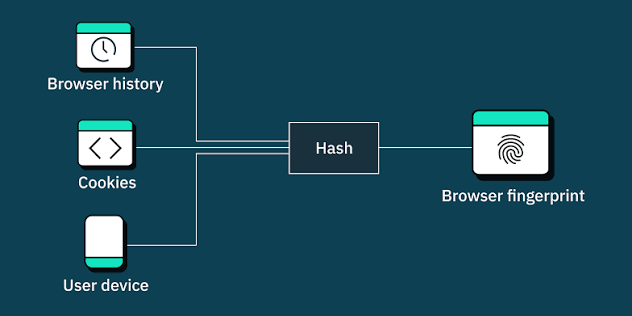
Online privacy and digital security have become important considerations for individuals, businesses, marketers, and technology professionals. Every time someone visits a website, the browser may share certain technical details about their device and browsing environment. These details can include the operating system, screen resolution, browser version, language preferences, and other characteristics. Websites may combine this information to create a digital profile known as a browser fingerprint.
A Fingerprint Browser is a specialized browser designed to help users manage browser fingerprint information and maintain separate browsing environments. It can be useful for privacy-conscious users, digital marketers, e-commerce professionals, and teams that manage multiple online accounts. Understanding how fingerprint browsers work, what features they provide, and where their limitations lie can help users make informed decisions about their online activities.
What Is a Fingerprint Browser?
A fingerprint browser is a browser or browser-management tool that provides controls over the technical characteristics websites can observe during a browsing session. Unlike a conventional browser, which generally uses a standard configuration for everyday browsing, some fingerprint browsers allow users to create separate browser profiles with distinct settings.
Each profile can maintain its own cookies, local storage, session information, and selected browser characteristics. This separation helps users organize different online activities without mixing data between profiles.
Browser fingerprinting itself is a technique used to identify or distinguish browsers through a combination of technical signals. Websites may examine factors such as installed fonts, graphics rendering, device capabilities, and browser configuration.
Fingerprint browsers attempt to manage some of these signals, but their effectiveness varies. They do not automatically make users anonymous, and they cannot guarantee complete protection against tracking.
How Does a Fingerprint Browser Work?
A fingerprint browser typically operates through isolated browser profiles. Each profile acts as a separate environment for a particular task, project, or account.
Separate Browser Profiles
Users can create multiple profiles instead of keeping every activity in a single browser environment. Each profile may store independent cookies, login sessions, browsing history, and website preferences.
For example, a digital marketing professional might use separate profiles for different client projects. Keeping these environments distinct can make account management more organized and reduce accidental session overlap.
Browser Fingerprint Management
A fingerprint browser may offer controls over certain browser characteristics, such as language settings, time zone, screen dimensions, and other configuration details.
However, changing individual settings does not necessarily make a browser less identifiable. Inconsistent or unusual combinations of technical characteristics can sometimes make a browser stand out rather than blend in with other users.
Reliable tools should aim for coherent configurations and explain which characteristics they control. Users should also understand that websites can employ additional tracking methods beyond browser fingerprinting.
Session and Cookie Isolation
Cookies and local storage help websites remember login sessions, preferences, and other information. When several accounts share the same browser profile, their stored data can become mixed.
Separate profiles help prevent this problem by maintaining independent storage environments. This feature is useful for professionals who need to switch between different workspaces regularly.
Key Features of a Fingerprint Browser
Fingerprint browsers offer different capabilities depending on the provider and software design. Several features are particularly important when comparing available options.
Profile Management
Profile management allows users to create, rename, organize, and maintain separate browsing environments. Clear profile organization can simplify repetitive tasks and reduce confusion when managing multiple projects.
Some tools also provide profile groups, labels, and search functions, making it easier to find the correct environment when working with a large collection of profiles.
Privacy Controls
Privacy controls help users review how browser information is handled. Depending on the software, these controls may include cookie management, tracking protection, permission settings, and selected fingerprint-related options.
Users should examine the actual protections offered instead of assuming that a product labeled as a fingerprint browser provides comprehensive privacy by default.
Team Collaboration
Some fingerprint browsers support shared workspaces and team access. These features can help marketing agencies, e-commerce teams, and remote employees coordinate their work.
Access permissions are particularly important. A well-designed platform should allow administrators to control who can view, modify, or use particular profiles. Secure authentication and clear activity records can also improve accountability.
Automation Support
Certain tools integrate with automation frameworks to assist with repetitive browser tasks. Depending on the platform, users may be able to automate routine activities such as opening approved websites, testing web pages, or collecting information they are authorized to access.
Automation should be implemented responsibly and in accordance with website rules, privacy requirements, and applicable laws.
Benefits of Using a Fingerprint Browser
Better Organization for Multiple Accounts
Professionals sometimes manage several legitimate accounts for different clients, brands, stores, or business responsibilities. A fingerprint browser can help keep these accounts organized in separate environments.
Independent profiles reduce the likelihood of using the wrong login session or accidentally sharing cookies between unrelated projects. This is especially valuable when several people work on different parts of a digital business.
Improved Privacy Awareness
A fingerprint browser can help users understand the technical information their browsers expose. By providing visibility into browser settings, it encourages more informed decisions about tracking, permissions, and data separation.
Nevertheless, privacy depends on multiple factors, including network activity, website behavior, account information, and the browser’s overall security design.
More Efficient Digital Workflows
Managing numerous browser sessions manually can become time-consuming. Profile organization, reusable settings, and supported automation features can help reduce repetitive work.
For agencies and online businesses, these improvements may simplify quality assurance, account administration, and project coordination.
Support for Web Testing
Developers and quality assurance teams often need to examine how websites behave under different browser configurations. Separate browser profiles can help them test language preferences, regional settings, session behavior, and user-interface differences.
This allows teams to identify compatibility problems and improve the experience for different categories of users.
Fingerprint Browser vs. Traditional Browser
Traditional browsers are designed for general web access, while fingerprint browsers place additional emphasis on profile separation and browser configuration management.
A traditional browser is often sufficient for everyday browsing, email, shopping, education, and entertainment. Many mainstream browsers also provide strong privacy features, tracking protection, and multiple user profiles.
A fingerprint browser may be more suitable when a professional needs extensive profile organization, dedicated session storage, or specialized testing controls.
The best choice depends on the intended purpose. Users should compare security updates, ease of use, data handling policies, supported integrations, and overall reliability rather than focusing exclusively on fingerprint customization.
How to Choose the Right Fingerprint Browser
Selecting a suitable fingerprint browser requires evaluating several factors.
First, review its security practices. The provider should explain how profile data is stored, whether sensitive information is encrypted, and how account access is protected.
Second, examine compatibility with your operating system and required websites. A tool that performs well for one workflow may not support another workflow adequately.
Third, consider usability. An intuitive interface, clear profile organization, and dependable performance can make everyday tasks easier.
Fourth, evaluate the provider’s privacy policy. Understand whether browsing information, profile configurations, or usage analytics are collected and how that information is retained.
Finally, consider customer support, software updates, pricing, and available documentation. Avoid choosing a product solely because it promises complete anonymity or guaranteed protection against detection. Such claims should be treated cautiously.
Limitations and Important Considerations
Although fingerprint browsers provide useful capabilities, they have important limitations.
First, browser fingerprinting is only one part of online identification. Websites may also use account details, IP addresses, behavioral patterns, and other signals to recognize activity.
Second, fingerprint management does not guarantee anonymity. A user who signs in to a personally identifiable account can still be recognized through that account, regardless of browser settings.
Third, poorly maintained software may introduce security vulnerabilities or expose sensitive information. Users should install reputable software, apply updates promptly, and enable appropriate security protections.
Finally, these tools should be used ethically. Maintaining separate work profiles, testing websites, and managing authorized business accounts are legitimate applications. Attempting to bypass security restrictions, misrepresent identity for harmful purposes, or violate platform policies can create legal and operational risks.
The Future of Fingerprint Browsers
As online tracking technologies evolve, fingerprint browsers are likely to remain relevant to privacy management, professional browsing, and web testing. Browser developers and privacy specialists continue to explore ways to reduce unnecessary information exposure while preserving website functionality.
Future tools may place greater emphasis on transparent privacy controls, stronger profile isolation, secure collaboration, and clearer explanations of fingerprint-related settings.
At the same time, websites will continue adapting their methods of distinguishing browsers. This ongoing development means that no single tool can provide a permanent solution to every tracking challenge.
Users should therefore view fingerprint browsers as one component of a broader digital privacy strategy rather than a complete replacement for secure browsing practices.
Conclusion
A Fingerprint Browser is a specialized tool that helps users manage browser profiles, separate online sessions, and control selected technical characteristics of their browsing environments. It can support digital marketing operations, e-commerce account administration, website testing, and privacy-conscious workflows.
However, its benefits depend on the quality of the software, the features it actually provides, and the way it is used. Evaluating security practices, profile isolation, compatibility, privacy policies, and software maintenance is essential before selecting a tool.
By understanding both the advantages and limitations of fingerprint browsers, individuals and businesses can make better decisions about browser management, online privacy, and responsible digital operations.
